


University life can get pretty busy. Between lectures, assignments, exams and group projects, there’s always something that needs your attention.
You’re also responsible for managing your time, keeping up with coursework and finding the right information for your assignments. And when several deadlines fall in the same week, things can quickly become overwhelming.
Luckily, there are plenty of online resources to help you stay on top of your studies. You can find reliable research, organise your assignments, revise difficult topics and learn new skills.
Here are nine useful online resources worth bookmarking during your university years.
TL;DR: Useful online resources for university students
| Resource | Best for |
|---|---|
| ResearchProspect | Academic writing, research guides and dissertation support |
| Zotero | Organising research and managing references |
| Smallpdf | Converting, combining and preparing documents |
| Khan Academy | Understanding difficult subjects |
| Notion | Tracking assignments and deadlines |
| Quizlet | Creating flashcards and revising for exams |
| Google Scholar | Finding academic research and credible sources |
| LinkedIn Learning | Developing practical career skills |
| University online library | Accessing journals, ebooks and research databases |
1. ResearchProspect: Get extra help with academic research and writing
Writing university assignments can be challenging, especially when you’re tackling your first research paper or dissertation.
At ResearchProspect, we offer academic writing and research support to help you through different stages of your studies.
You can explore our free guides on choosing research topics, structuring essays and dissertations, referencing sources and avoiding plagiarism. We also share academic writing samples to help you understand what to include in your work.
If you need more personalised guidance, we offer paid academic writing and support services.
Whether you’re planning your first essay or working on your final dissertation, you can explore our resources and find the support you need.
2. Zotero: Keep your research and references organised
Researching an assignment often means juggling dozens of browser tabs, downloaded articles and notes. By the time you start writing, you might struggle to remember where you found certain information.
Zotero helps you collect, organise and cite academic sources in one place. You can save articles directly from your browser, along with details such as the author, title and publication date. You can also create folders for different assignments or modules to keep your research organised.
If you’re writing a dissertation, you can group your sources into collections for your literature review, methodology and theoretical framework.
Zotero also works with Microsoft Word and Google Docs, so you can insert citations as you write and generate a reference list automatically. Just double-check your references against your university’s guidelines before submitting your work.
3. Smallpdf: Prepare documents for sharing and submission
Between lecture slides, research papers, assignments and study notes, you’ll work with plenty of documents at university. And sometimes, you’ll need to change a file’s format before you can share or submit it.
For example, if you’ve saved your notes in Rich Text Format (RTF), you can use Smallpdf’s free RTF to PDF converter to turn them into a PDF.
Just upload your file and download the converted version. Smallpdf keeps basic formatting like headings, lists and spacing intact, so your notes remain easy to read.
Other useful Smallpdf tools for students
Smallpdf also offers tools to help you manage your documents:
- Merge PDF: Combine multiple documents into one file.
- Compress PDF: Reduce large files to meet upload limits.
- PDF converter: Convert documents between supported formats.
- Split PDF: Extract specific pages from a larger document.
These tools come in handy when you’re combining research materials, sharing notes or preparing assignments for submission. Just always check your final document before uploading it to make sure the formatting looks right.
4. Khan Academy: Get extra help with difficult subjects
Have you ever sat through an entire lecture, taken pages of notes and still walked away feeling confused?
Sometimes you just need someone to explain a topic differently. Khan Academy offers free video lessons and practice exercises covering mathematics, statistics, economics, science and more.
For example, if you’re struggling with financial calculations in your business course, you can revisit the mathematical concepts behind them. You can pause videos, replay explanations and test your understanding with practice exercises.
How to use Khan Academy for studying
If you’re struggling with a topic, try these steps:
- Review your lecture notes and identify what you don’t understand.
- Find a Khan Academy lesson that explains the concept.
- Watch the video and complete a few practice exercises.
- Return to your lecture notes and see if things make more sense.
Khan Academy won’t cover every university-level topic, but it can help you strengthen your understanding of the basics.
5. Notion: Keep track of assignments and deadlines
University comes with plenty of deadlines, and keeping track of assignments, exams and lectures can quickly become overwhelming. Notion helps you organise everything in one place. You can create study schedules, keep lecture notes and track assignments across your different modules.
For example, you can set up a simple assignment tracker:
| Assignment | Due date | Status |
|---|---|---|
| Psychology research essay | 12 March | Researching |
| Economics case study | 18 March | Writing |
| Statistics project | 25 March | Not started |
You can also add research links, create checklists and break larger assignments into smaller tasks.
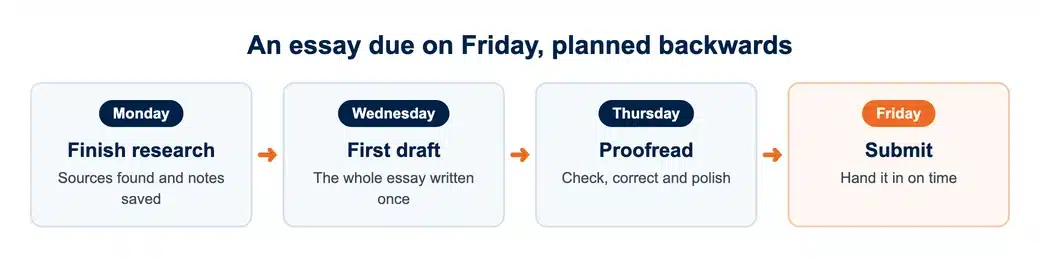
If you have an essay due on Friday, plan to finish your research on Monday, write your first draft by Wednesday and proofread it on Thursday. This way, you know exactly what you need to work on each day.
Start with a basic calendar and assignment tracker. You can always add more features as you get comfortable using Notion.
Need a final check before you submit?
Our proofreaders and editors check grammar, structure and referencing so your work is ready to hand in.
6. Quizlet: Make exam revision more effective
You can read through your notes several times and still forget important information during an exam. Testing yourself regularly helps you remember what you’ve learned and identify topics you need to revisit.
Quizlet lets you create digital flashcards to practise important concepts, definitions and facts. Biology students can create flashcards for scientific terms, while law students can use them to revise legal principles. You can also browse study sets that other students have shared, but double-check the information against your course materials.
Quizlet has free study features, although you’ll need a subscription for some extras. Try reviewing your flashcards for 10–15 minutes after each lecture. You’ll quickly see which topics you understand and which ones need more attention before your exams.
7. Google Scholar: Find reliable information for assignments
A quick Google search can help you understand a topic, but university assignments usually require more credible sources to support your arguments.
Google Scholar helps you find academic research, including journal articles, research papers and scholarly books. If you’re writing about how remote learning affects student performance, for example, you can search for studies that examine the topic and use their findings to strengthen your argument.
Google Scholar also lets you:
- Filter research by publication date.
- Find related studies on the same topic.
- See which papers have cited a particular study.
- Generate citations in different referencing styles.
- Look for free versions of academic papers.
Example: following a paper’s “Cited by” trail
One feature worth exploring is Cited by. Click it beneath a research paper to discover other studies that reference the original work.
This can help you find more recent research or explore different perspectives on your topic.
Before adding a source to your assignment, check who wrote it, when they published it and whether it comes from a credible academic publication.
8. LinkedIn Learning: Develop skills beyond your degree
University teaches you a lot, but there are always extra skills worth learning before you enter the working world. LinkedIn Learning offers courses on business, technology, communication, design and more.
You can learn how to use Excel, improve your presentation skills or get familiar with software you’ll likely use in your career.
For example, marketing students can learn about digital advertising, while business students can explore project management or data analysis. Many courses also include practical exercises to help you put your new skills to use.
LinkedIn Learning requires a subscription, but some universities offer students free access, so check with yours first. If you’re still unsure about your career plans, you can also explore different subjects and discover new interests before graduating.
9. Your university’s online library: Make the most of your student access
Before paying for another subscription, take some time to explore what your university’s online library has to offer. Most universities give students access to academic journals, ebooks, research databases and other learning materials.
Depending on where you study, this could include databases such as JSTOR, ScienceDirect and research collections specific to your course.
Before paying for another subscription, take some time to explore what your university’s online library has to offer.
These resources are especially useful when you’re writing essays, working on research projects or preparing your dissertation.
For example, you might find a promising journal article through Google Scholar, only to discover that you need to pay to read the full paper.
Before giving up or paying for access, search for the article through your university library. Your institution might already have a subscription that lets you download it for free.
And there’s more to your university library than books and academic papers. Many also provide additional support to help you with your studies.
Depending on your university, you could:
- Book an online consultation with a librarian.
- Attend workshops to improve your research skills.
- Get help finding credible sources for assignments.
- Find referencing guides and tutorials.
- Request research materials from other libraries.
A little extra support goes a long way
University gives you plenty of opportunities to learn, develop new skills and prepare for your future career. And with so many online resources available, you can find extra support for almost every part of your studies.
Take some time to explore what’s available and see what works for you. Some resources offer free access, while others require a subscription or come through your university.
Whether you want to improve your writing, understand a difficult subject or get better at managing your workload, the right resources can make university life a little easier.
And remember, university is about more than getting good grades. It’s also your chance to discover new interests and build skills you’ll use long after graduation.
Working on a dissertation?
Get support from a UK academic in your subject, from research and structure through to the final draft.