


Studying abroad is exciting, but it also means navigating a lot of unfamiliar things, including how you stay safe online.
From logging into your university portal to checking your bank account or submitting assignments, you’ll probably rely on the internet more than you expect. And whether you’re using Wi-Fi in your student accommodation, a campus library, or your favourite café, not every connection comes with the same level of security.
The good news? You don’t need to be a cybersecurity expert to protect yourself.
A few simple habits can make a real difference in keeping your personal information, academic work, and online accounts secure.
In this guide, we’ll cover practical online safety tips every international student should know, so you can focus less on digital risks and more on making the most of your experience abroad.

1. Stay Safe When Using Public and Campus Wi-Fi
One of the first things you’ll probably do after arriving in a new country is connect to Wi-Fi. It might be at the airport while checking directions, in your student accommodation while contacting family, or at a café while catching up on coursework.
Free internet is convenient, especially when you’re trying to keep your student budget under control. But convenience shouldn’t mean connecting to every available network without thinking twice.
Public Wi-Fi isn’t automatically dangerous. Most reputable websites and apps already encrypt their connections, making it much harder for outsiders to read the information you exchange with them. However, unfamiliar networks can still introduce risks, particularly when attackers create fake hotspots or redirect users toward fraudulent login pages.
Example: two Wi-Fi networks with nearly identical names
Imagine sitting in a university café and noticing two networks with nearly identical names. One belongs to the café, while the other could be an imitation designed to attract unsuspecting users.
If you connect to the wrong one and enter your details on a fake sign-in page, your information could be exposed.
That’s why verifying a network before connecting matters.
Ask staff for the official Wi-Fi name, avoid suspicious login pages, and disable automatic connections to networks you don’t recognise. It’s also worth checking that websites use HTTPS before entering sensitive information.
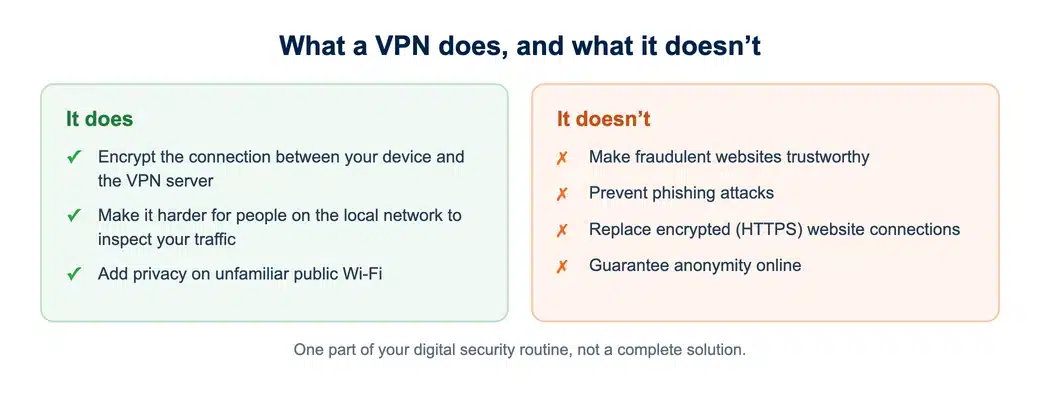
For additional network privacy, using a VPN can be helpful, particularly when you’re connecting through unfamiliar public networks. A VPN encrypts the connection between your device and the VPN server, making it harder for people monitoring the local network to inspect your traffic.
However, it’s important to understand what this protection actually does. A VPN doesn’t make fraudulent websites trustworthy, prevent phishing attacks, or replace encrypted website connections. It also doesn’t guarantee anonymity online.
Think of it as one part of your digital security routine rather than a complete solution.
Campus Wi-Fi deserves similar attention. Universities generally manage their networks professionally, but that doesn’t mean every device or connection is equally secure. Follow your institution’s network guidelines and use its official sign-in procedures.
If your university provides its own VPN for accessing academic resources, remember that this serves a different purpose from a personal privacy VPN. Some university systems require specific institutional connections, so check with your IT department before making changes.
The goal isn’t to avoid public Wi-Fi altogether. It’s to connect more carefully, understand the available protections, and avoid treating every network as equally trustworthy.
2. Secure Your University and Personal Accounts
Your university email account might seem like just another inbox, but it’s often connected to much more than messages.
It may provide access to your learning platform, library resources, assignment submissions, cloud storage, and important administrative services. If someone gains control of that account, the consequences could extend well beyond a few missing emails.
That’s why account security should be one of your priorities when studying abroad.
Start with passwords.
Using the same password for your university portal, personal email, and social media accounts might seem convenient. After all, remembering several complicated passwords isn’t anyone’s idea of fun.
The problem is that if one service suffers a data breach, attackers may try the exposed credentials on other platforms. A single compromised password could then put several accounts at risk.
A password manager makes this easier to manage. It can generate and store strong, unique passwords, so you don’t need to memorise a different complicated combination for every service.
Next, enable multi-factor authentication wherever it’s available.
This adds another verification step when you sign in, such as an authenticator app or a security key. Even if someone discovers your password, that additional requirement can make unauthorised access significantly harder.
Before leaving home, check that your authentication methods will still work abroad. Students sometimes change phone numbers or lose access to their original SIM cards after moving countries. Having secure backup recovery options can prevent a frustrating account lockout during an important deadline.
You should also learn to recognise phishing emails.
International students may receive messages about tuition payments, visa documentation, accommodation, scholarships, or university registration. Unfortunately, scammers can imitate these communications to make fraudulent requests look convincing.
Suppose you receive an urgent email saying your university account will be suspended unless you confirm your password immediately.
Instead of clicking the link, open your university’s official website independently and check whether the notification is genuine. If you’re uncertain, contact the university’s IT support team using its published contact information.
Urgency isn’t proof of authenticity. In fact, pressure to act immediately is often a reason to slow down.
A few seconds spent verifying a message can save you from a much bigger problem later.
3. Protect Your Devices and Important Documents
When you’re studying overseas, your laptop and smartphone quickly become essential parts of everyday life.
They hold your lecture notes, research materials, personal photos, travel documents, and access to important accounts. Losing a device is inconvenient enough. Losing the information stored on it can be much worse.
Fortunately, protecting your devices doesn’t require complicated technical knowledge.
Start by keeping your operating system, browser, and applications updated.
Software updates aren’t just about new features or visual improvements. They frequently address security vulnerabilities that attackers could otherwise exploit. Enabling automatic updates where practical helps you avoid falling behind.
It’s also important to protect access to the device itself.
Use a strong passcode or password, enable automatic screen locking, and turn on full-disk encryption if your device supports it. Encryption helps protect stored information if your laptop or phone is lost or stolen, particularly when the device is powered off or properly locked.
This matters more than you might think when you’re frequently moving between classrooms, libraries, trains, and shared accommodation.
Now consider your academic work.
Imagine spending several weeks writing a dissertation chapter, only for your laptop to stop working the night before a submission deadline. Without a recent backup, recovering that work could be difficult or impossible.
Don’t rely on a single copy of important documents.
Use a trusted backup system, preferably including a university-approved cloud storage service and an independent backup where appropriate. Make sure files are actually syncing, and occasionally check whether you can restore them.
For sensitive research materials, follow your university’s data-handling policies rather than assuming ordinary personal cloud storage is suitable. Interview transcripts, participant information, and unpublished research may require additional safeguards.
Shared computers deserve extra care, too.
If you use a computer in a university library, avoid saving passwords in its browser or downloading sensitive files unnecessarily. Sign out of your accounts when finished, especially if the computer doesn’t automatically end your session.
And remember that not every document needs to live on every device.
Keeping particularly sensitive materials in approved, access-controlled storage reduces the amount of information exposed if a device goes missing.
The best device security strategy is often the simplest: keep your software updated, restrict access, and maintain reliable backups before something goes wrong.
Deadline pressure while settling in abroad?
If a lost file or a new country has put you behind, a UK academic can help you get your dissertation back on track.
4. Be Careful with Online Payments and Student Scams
Studying abroad usually involves plenty of unfamiliar expenses.

You might need to pay an accommodation deposit, purchase travel tickets, arrange insurance, or transfer money for university-related costs. When you’re dealing with new companies, payment systems, and currencies, it isn’t always obvious which requests are legitimate.
Unfortunately, scammers know that international students are navigating unfamiliar processes.
Accommodation fraud is one example.
You find an apartment online that looks perfect: affordable rent, a convenient location, and photographs of a well-furnished room. The person advertising it claims there are several interested students and insists you transfer a deposit immediately.
It’s tempting, particularly when you’re worried about finding somewhere to live before classes begin.
But paying before verifying the property and landlord can put your money at risk.
Whenever possible, use your university’s accommodation resources or established rental platforms. Verify the property’s details, review the payment terms, and be cautious about requests to transfer money outside the platform’s normal process.
Tuition-related scams can be equally convincing.
A fraudulent message might claim that your payment failed or that your student status is at risk unless you send money to a new bank account.
Before making any payment, independently verify the instructions through your university’s official student portal or finance department.
Don’t rely on a phone number or link included in a suspicious message. Fraudsters can create realistic-looking websites and impersonate university staff.
The same caution applies to scholarship offers, part-time job opportunities, and unexpected refund notifications.
Be particularly wary when someone requests your banking password, authentication code, or payment in an unusual form, such as gift cards or cryptocurrency.
Your online banking security also deserves regular attention.
Enable transaction notifications where available, review your account activity, and contact your bank promptly if you notice something unexpected.
If you accidentally enter your details into a suspicious website, act quickly. Change affected passwords through the legitimate service, secure related accounts, and contact the relevant bank or institution when necessary.
Being cautious doesn’t mean assuming everyone is dishonest.
It simply means recognising that a convincing message or attractive offer isn’t enough to establish trust.
| Scam | Warning sign | What to do instead |
|---|---|---|
| Accommodation fraud | Pressure to transfer a deposit immediately for a property you have not verified | Use your university’s accommodation resources or established rental platforms, and verify the property and landlord first |
| Tuition payment scam | A claim that your payment failed or your status is at risk unless you pay into a new bank account | Verify the instructions through your university’s official student portal or finance department |
| Fake account warning | An urgent email saying your account will be suspended unless you confirm your password | Open the university’s official website independently, or contact IT support using its published details |
| Scholarship, job or refund offer | Requests for your banking password, an authentication code, gift cards or cryptocurrency | Treat the request as suspicious and check it with the organisation directly |
5. Build Simple Digital Safety Habits While Abroad
Here’s something worth remembering: online security isn’t a task you complete once and forget about.
It’s a collection of small decisions that become easier when they’re part of your routine.
The good news is that you don’t have to constantly think about cybersecurity to stay reasonably protected.
Start by reviewing your privacy settings.
Many apps request access to your location, camera, microphone, contacts, or other personal information. Some permissions are necessary for specific features, while others might not be useful to you.
Take a few minutes to check which permissions you’ve granted and remove access that no longer serves a purpose.
Location sharing is particularly worth reviewing when you’re travelling or living in a new country. Posting your exact location publicly in real time can reveal more about your movements than you intend.
You should also be thoughtful about how you separate academic and personal activities.
Using your university email for every shopping website, entertainment subscription, and social media account creates unnecessary connections between different parts of your digital life.
Where practical, keep your academic accounts focused on university activities and use a separate personal email for unrelated services.
This can make accounts easier to manage and help you recognise suspicious messages.
Before travelling between cities or countries, take a moment to prepare your devices. Download essential travel documents from legitimate sources, confirm that important files are backed up, and check that you can access your accounts without relying on a single phone number.
It’s also sensible to know where to ask for help.
Most universities provide IT support, cybersecurity guidance, and procedures for reporting suspicious messages or compromised accounts. Knowing how to reach these services before an incident occurs can make a stressful situation easier to handle.
If your university has specific rules for accessing research systems or handling confidential information, follow them. Personal security tools should complement institutional requirements, not replace them.
Finally, avoid trying to build the perfect security setup overnight.
You don’t need dozens of apps or complicated configurations. In fact, too many unfamiliar tools can make everyday tasks harder without necessarily improving your protection.
Instead, focus on habits you can maintain.
- Keep your devices updated.
- Use unique passwords.
- Verify unusual requests.
- Back up your work.
- Pay attention when connecting to unfamiliar networks.
These actions might sound ordinary, but consistency is what makes them valuable.
And when something feels suspicious, trust that instinct enough to investigate before proceeding.
Short on time in your first term?
Get support from UK academics on essays, reports and other coursework while you settle in.
Whether you’re studying in your university library, travelling during the holidays, or working on an assignment from your accommodation, a little awareness can go a long way.
Conclusion: Enjoy Studying Abroad Without Overlooking Online Safety
Studying abroad should be about discovering new places, meeting new people, and making progress toward your academic goals, not constantly worrying about digital threats.
Still, your online accounts, personal documents, and academic work deserve the same attention you give to your passport or other important belongings.
You don’t need advanced technical skills to protect them. Safer network connections, stronger account security, regular backups, and a healthy awareness of scams can reduce many everyday risks.
The most effective approach is to make these precautions part of your routine before a problem occurs.
That way, you can spend less time worrying about online security and more time enjoying everything your study-abroad experience has to offer.