


You use AI every week, probably every day. It drafts your emails, summarises readings, and answers questions in seconds. But behind every one of those instant answers sits a very physical piece of engineering: the chip that did the maths.
For students in computer science, data science, engineering, or any field now touched by AI, understanding that hardware is quietly becoming part of the syllabus. You do not need to be a chip designer. You do need to know why AI runs the way it does, and what it costs.
This guide explains the hardware behind modern AI in plain terms, and why one chip in particular, the GPU, changed everything.
CPU vs GPU: a quick mental model
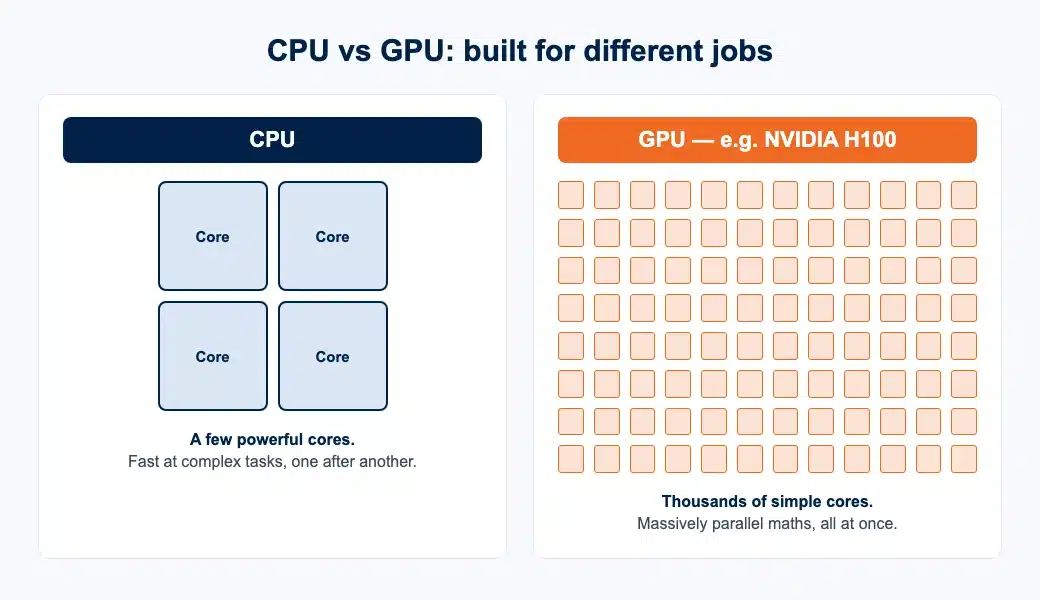
Your laptop runs on a CPU, a central processing unit. A CPU is like a brilliant chef working alone: it does complex tasks one after another, very fast, in sequence.
A GPU, a graphics processing unit, is different. It is like a huge kitchen of hundreds of cooks, each doing one simple step at the same time. Individually slower, together they finish enormous batches of simple work far faster.
Why AI needs GPUs
Training and running an AI model means multiplying vast grids of numbers, over and over. This work is highly parallel: millions of small multiplications that do not depend on each other and can run simultaneously.
That is exactly what GPUs were built for, originally to render game graphics. Researchers realised the same parallel muscle could train neural networks, and the modern AI boom followed almost immediately.
A task that might take a CPU weeks can take a cluster of GPUs hours. That speed difference is the whole reason large language models became practical.
Where the H100 fits in
When people talk about the chips powering today’s AI, they usually mean NVIDIA’s data-centre GPUs. The H100 became the workhorse of the current generation: it is built specifically for training and running large models at scale.
Its advantages are memory bandwidth (moving huge amounts of data quickly), specialised units for the maths AI uses most, and the ability to link many chips into one giant system. In practice, the biggest models you have heard of were trained on thousands of these working together.
| Feature | CPU | GPU (e.g. H100) |
|---|---|---|
| Cores | Few, very powerful | Thousands, simpler |
| Best at | Sequential, complex tasks | Massively parallel maths |
| AI training speed | Slow | Fast |
| Typical use | Everyday computing | Training and running AI models |
What GPU power means for your studies
Three practical points matter if AI touches your studies.
First, cost shapes research. Compute is expensive, so access to GPUs often decides what projects a lab, or a student, can realistically attempt. Knowing this helps you scope a dissertation or final-year project sensibly.
Second, efficiency is a skill. Because GPU time costs money, writing efficient code and choosing the right model size is now a genuine research skill, not just an optimisation afterthought.
Third, you rarely need the biggest chip. For most student projects, a smaller cloud GPU, or a shared university cluster, is plenty. Reserve the heavyweight hardware for genuinely large work.
A worked example
Imagine a data-science student fine-tuning a model to classify research abstracts by topic.
On a CPU, a single training run might take two days, making experimentation painful: you get one attempt, then wait. On a capable GPU, the same run finishes in an hour or two, so you can test ten ideas in the time the CPU gave you one.
That is the real gift of GPU compute for students: not just speed, but the freedom to experiment, fail quickly, and learn.
How to get GPU access as a student
You have three realistic routes to GPU compute as a student.
Your university cluster is usually the first and cheapest: ask your department, as many have shared GPU resources for research. Cloud platforms are the second, renting time by the hour, which suits short bursts of work.
The third, for labs or serious hobbyists building a permanent setup, is owning the hardware directly. Data-centre cards are costly new, but options like H100 GPUs for AI workloads have become more accessible on the secondary market, making a local AI workstation a realistic option for smaller teams.
| Route | Cost | Best for |
|---|---|---|
| University cluster | Often free — ask your department | Most student and research projects |
| Cloud GPUs (rent by the hour) | Pay per hour | Short bursts and one-off training runs |
| Owning the hardware | Higher upfront; cheaper on the secondary market | Labs and serious builders needing a permanent setup |
Whichever route you take, the principle is the same: match the hardware to the size of the job, and do not pay for more than your project needs.
Working on an AI, data or computer-science project?
Our subject specialists help you scope, structure and write up technical dissertations and research projects, whatever hardware you use.
The bottom line
AI can feel like magic, but it runs on physics and engineering you can understand. The core idea is simple: AI is a mountain of parallel maths, and GPUs like the H100 are machines built to climb it.
For students, that understanding is genuinely useful. It shapes what projects are feasible, makes you a sharper and more cost-aware researcher, and demystifies the technology you will be working alongside for the rest of your career. The magic, it turns out, is just very well-organised arithmetic.