What will a prospective employer see if they search for you online? Will they see an empty LinkedIn profile, old social media posts, or nothing at all?
Many people have valuable skills but aren’t sure how to show them online. This can make it harder to apply for jobs and internships.
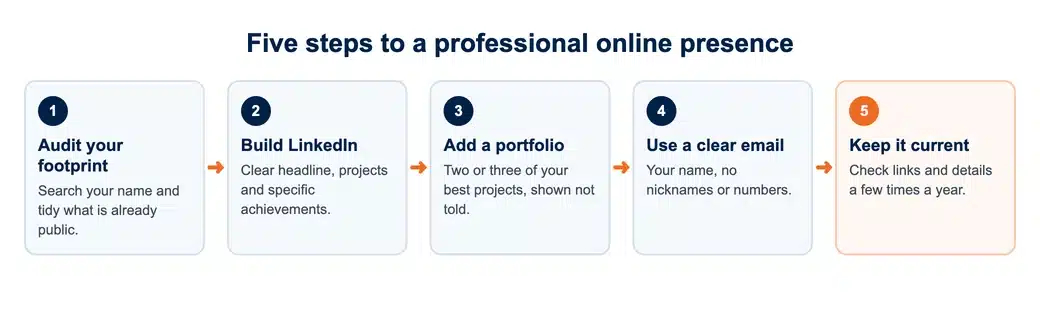
Even if you’ve got no job experience at all, you can still clearly highlight your skills, your projects, and your achievements.
What Is a Professional Online Presence?
Your online profile (your professional online presence) is all about your education, skills, experience, and achievements. That’s your LinkedIn profile, your online portfolio, and any published work you’ve got. It’s there for employers, recruiters, and researchers to get a sense of who you are and what you can do.
It’s not just about having a social media account. Your profiles need to demonstrate your skills and your actual work.
Example: a professional online presence at each stage
For example, a student looking for an internship could share class projects on LinkedIn. A graduate could use an online portfolio to showcase their work to potential employers.
Postgrads could share published research or conference presentations to connect with other researchers.
Review Your Existing Digital Footprint
Your digital footprint is the information about you that’s available online. Before you go around creating new profiles, check what profiles are already out there.
Search Your Name Online
Search your name on Google and have a look at the first five results. See if there are any old social media profiles out there (old Facebook, old Twitter, etc.), any photos, or any comments or posts you’ve been tagged in.
If your name is common, then try adding your uni or your city to it.
Update Your Privacy Settings
Check who can see your posts, photos, and personal details on each social media site. Don’t share any personal information with an employer if you want to keep it private.
Remove the old stuff and delete any posts that might be confusing. You don’t necessarily have to delete your profiles; just make sure any information you want to keep private isn’t publicly visible.
- Search your name and note every result on the first page.
- Lock down or delete old social accounts you no longer use.
- Untag yourself from photos you would not show an employer.
- Check that your profile photo looks the same everywhere.
Create a LinkedIn Profile That Highlights Your Skills
LinkedIn helps employers and recruiters find your education, skills, and experience. Even if you haven’t worked yet, you can start building a profile that will help you. You can also learn how to write a CV with no experience to present your academic projects and achievements when applying for jobs.
Write a Clear Headline and Summary
Add keywords to your headline that show what you study and what skills you have.
Example: a clear LinkedIn headline
For example, you could write: Computer Science Student | Python & Data Analysis | Interested in Software Development.
In your summary, please briefly describe what you are studying, what you are learning, and what kind of work you are interested in.
Add Academic Projects, Skills, and Achievements
Include relevant courses, internships, research projects, volunteer work, and student organisations.
Example: vague versus specific
Instead of just saying “Worked on a university project,” be specific. For example: “Analysed responses from 100 students and presented the survey results.”
Connect With Relevant People
Connect with your classmates, university alumni, professors, and professionals in your field.
When you send a connection request, just introduce yourself and let them know why you’d like to connect. A shared uni, a recent event, or your interest in their work would all be perfectly valid reasons.
Build an Online Portfolio to Showcase Your Work
An online portfolio doesn’t just describe your skills; it shows potential employers your work. You can include projects you’ve done at school.
An online portfolio doesn’t just describe your skills; it shows potential employers your work.
What Should a Student Portfolio Include?
Start with a brief introduction about yourself and your studies. Then add:
- Your top two or three best projects.
- The skills you picked up from each project.
- A short explanation of what you did and what you achieved.
- Other contact details or links to your profiles.
You can also include a dissertation abstract, a design project, a published article, or a data analysis project.
Choose a Platform That Fits Your Field
Use GitHub for coding projects, a portfolio site for design or writing samples, or an academic profile for research papers. If you want to build a website to showcase your work, you can also follow GitHub’s guide to creating a portfolio website.
| Your field | Best place to show your work | What to put there |
|---|---|---|
| Computing and data | GitHub, plus a LinkedIn profile | Code projects with a short README explaining what each one does |
| Design, media and writing | A personal portfolio website | Your two or three strongest pieces, each with a line on your role |
| Research and postgraduate study | An academic profile such as Google Scholar or ORCID | Publications, conference papers and research posters |
| Business, law and most other subjects | Projects, placements, societies and the skills each one shows |
Only publish work if you have the go-ahead to do so. Check your university’s guidelines before you upload any graded work, any confidential information, or any unpublished research.
Use a Professional Email Address for Academic and Career Communication
Your email address is generally the first thing an employer, lecturer, or recruiter will see. Make it easy for them to spot you by using a clear address.
Choose an Email Address That Is Easy to Recognise
Use your full name (firstname.lastname at email), not nicknames or numbers.
You can apply for jobs using a free email address. If you’re freelancing or running your own business, a professional email address with your own domain will help keep work and personal emails separate.
The same rules apply to a cover letter. Our tips on writing a cover letter with no work experience show how to turn coursework into evidence.
Write Clear and Respectful Emails
Use a subject line that explains the purpose of your email. Start with a polite greeting and keep your message brief.
Make sure you’re attaching the right files before you send the email. Don’t forget to include your full name and contact details at the end.
If you don’t get a reply after a reasonable period of time, then send a follow-up email.
Applying for a master’s or PhD?
Our UK academics can help you write a personal statement that makes the most of your projects and experience.
If you are aiming for research roles or a PhD, keep an academic CV alongside your profiles, so publications and conference work are listed in the format academics expect.
Share Your Academic Work and Achievements Online
You don’t need any work experience at all to demonstrate your abilities. Your university projects, research posters, presentations, and all your academic achievements are all very much in play.
Share your work on LinkedIn or in your online portfolio. Write a few short posts explaining what you did, what you learned, and what skills you used.
Keep Your Online Profiles Consistent and Up to Date
Your basic info on LinkedIn, your online portfolio, and any other professional accounts should be the same. Same name, same education, same skills (and those skills should be up to date).
Ensure your links work and your contact details are correct. If an employer clicks a broken link or emails you to an old address, they may well be unable to get in touch with you.
Regularly review your profiles (e.g., after completing a course, an internship, a research project, or other qualification) and add in your most recent work, removing the old stuff.
You don’t need to update everything every week. Just check that your profiles are accurate a few times a year.
Want your CV and profiles checked?
Our proofreaders check grammar, clarity and consistency before you send anything to an employer.
Common Mistakes Students Should Avoid
Mistakes on your online profiles can make it harder for employers or researchers to get a clear picture of your skills and experience.
- Exaggerating your experience: don’t claim any skills or qualifications that you haven’t actually got. Be specific about what you have actually learned and what you have actually done.
- Using informal contact details: Avoid email addresses with nicknames or jokes when applying for internships, jobs, or research positions.
- Incomplete profiles: Add your education, skills, projects, and contact details before you share your profile with employers.
- Sharing work without permission: Don’t upload any unpublished research, group work, or uni work without checking the rules and getting permission.
- Don’t post too much personal information: Don’t share your home address, phone number, student ID, or any other private documents.
Conclusion
Employers and researchers can see what you’re capable of and what you’ve achieved through your online professional presence. Keep your LinkedIn profile up to date, share your best work, and make sure your contact details are correct.
Build a profile that showcases your experience and keep it updated as you develop new skills and gain new experience.