


Every time you log in, run a search or download a paper, you leave a trace. Researchers leave more than most, because their work runs through university accounts, journal databases, shared drives and public profiles.
Some of that visibility is the point: you want your work to be found. The problem is the rest of it, the passive data that builds up quietly and can be joined together by anyone who looks.
This guide covers what researchers leave behind, who can see it, and how to shrink it without slowing your work down.
What Counts as a Digital Footprint in Academic Work
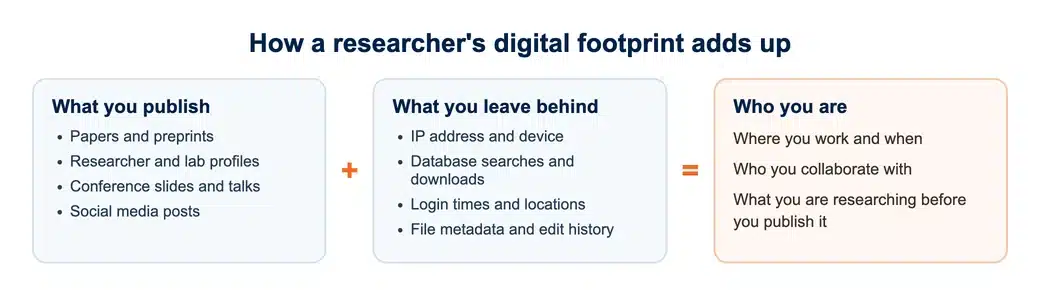
A digital footprint is the data your online activity creates. Part of it you publish on purpose: papers, conference slides, lab pages and researcher profiles such as Google Scholar.
The rest is created passively. IP addresses, browser history, login times, device identifiers and file metadata are recorded as you work, usually without you seeing them.
Put together, the two halves can show who you are, where you work, when you work and who you work with. That is a lot to hand to a stranger.
Where Researchers Leave Traces
The sources below appear in almost every research workflow, and each one reveals something different.
| Source | What it reveals | Who can see it |
|---|---|---|
| Academic profiles | Your institution, papers and research interests | Anyone online |
| Journal and database logins | What you search, what you download, your IP address | Publishers, your institution, network operators |
| Cloud storage and shared drives | File names, who you share with, edit history | Providers, collaborators, administrators |
| Public Wi-Fi sessions | The sites you visit and your device details | The network owner, possibly attackers |
| Social media and conference tags | Your location, travel plans and colleagues | Followers, event attendees, often the public |
None of these is unusual on its own. The risk comes from how easily they can be combined, by an advertiser, a scammer or simply a curious reader.
You can’t erase yourself from the internet. You can make yourself much harder to piece together.
Why Your Footprint Matters More as a Researcher
Most internet users are targeted by advertisers. Researchers can be targeted more precisely, because so much about them is public and linked to an institution.
- Participant safety. Interview and survey files can identify people if documents, metadata or emails leak, even when names never appear in the final paper.
- Research integrity. Search histories and shared drafts can reveal unpublished ideas or early results you are not ready to share.
- Account security. A public profile gives attackers your name, email address and collaborators, which makes phishing emails far more convincing.
- Reputation. Old posts and tagged photos can resurface during a hiring process, a promotion review or a funding decision.
The first point is the one ethics committees care about most. If your study involves research interviews, the files and emails around them are part of your duty of confidentiality.
Your research ethics approval normally sets out how participant data will be stored and shared. A careless upload or an unscrubbed document can break that promise as surely as a lost laptop.
Worked example: what ten minutes of searching can reveal
Take a fictional PhD student, Dan, who studies workplace stress. His university profile lists his department and supervisor. A conference programme shows the city and date of his next talk.
A questionnaire he shared still carries his full name and edit history in its file properties, and a tagged photo shows the café he works from most mornings.
None of this was secret. Together it gives a stranger his routine, his collaborators and a convincing story for a phishing email that appears to come from his supervisor.
Practical Ways to Shrink Your Footprint
You cannot disappear, and you should not try, because visibility helps your career. The aim is to keep what helps and remove what doesn’t. Start with what is already out there, then change what you put out next.
Audit what is public
Search your own name in a private browser window. Go through every academic and social profile you have created. Delete old pages, remove phone numbers and home addresses, and keep only what collaborators genuinely need.
If you are about to publish in a journal, decide now which email address will appear on the paper. A dedicated work address keeps your personal inbox out of the public record.
Lock down your accounts
Use a password manager so every account has its own unique password, then turn on multifactor authentication for email, cloud storage and university portals. CISA has a clear guide to requiring multifactor authentication.
Public profiles make you an easier target for convincing scams. Our guide to online scams that target students shows the fake login emails to watch for.
Limit tracking while you browse
Ad trackers follow you from site to site, including journal and database pages. Privacy Badger, a free browser extension from the Electronic Frontier Foundation, blocks many of them automatically.
Strip metadata before sharing
Documents and images often carry your name, edit history and location. Remove that information before sending files to participants or uploading supplementary material to a repository.
- In Word, use Inspect Document to remove author names, comments and tracked changes.
- In Adobe Acrobat, use the Redact or Remove Hidden Information tools before sharing a PDF.
- For photos, turn off location tagging in your camera settings, or strip the data before posting.
- Check spreadsheets for hidden sheets and columns before sending survey data to anyone.
Getting your research ready to publish?
Our publishing specialists can prepare your manuscript for journal submission, from formatting to cover letter.
Where a VPN Fits in Research Privacy
A VPN encrypts your connection and hides your IP address from the sites you visit. That is its main benefit for researchers: it cuts the amount of passive data you leave behind, especially on shared Wi-Fi at campus, in libraries and at conferences.
It will not hide what you do once you are logged in, so use it alongside the habits above. VPNpro’s privacy guides explain encryption and tracking in plain terms if you want to understand the basics before choosing a tool.
For work with vulnerable participants or sensitive topics, the EFF’s Surveillance Self-Defense library goes deeper on threat modelling and on who might want your data.
Universities are tightening their own systems for the same reasons, as our look at how cybersecurity is shaping academic research explains.
If you often work away from campus, read how students can protect their research data on public Wi-Fi.
Conclusion
Research depends on the internet, so you will always leave data behind. What you can control is how much stays visible, and to whom.
Audit your public profiles, lock down your accounts, block trackers and strip metadata from the files you share. Then use a VPN on networks you don’t control. These steps take minutes, and they protect your career and the people who trust you with their data.
Want a second pair of eyes on your paper?
Our academic editors check clarity, structure and referencing before you submit.