


Library tables, campus cafés, airport lounges: most students end up doing part of their research on a network they don’t control. Interview transcripts, survey responses, draft chapters and university logins all travel over that connection.
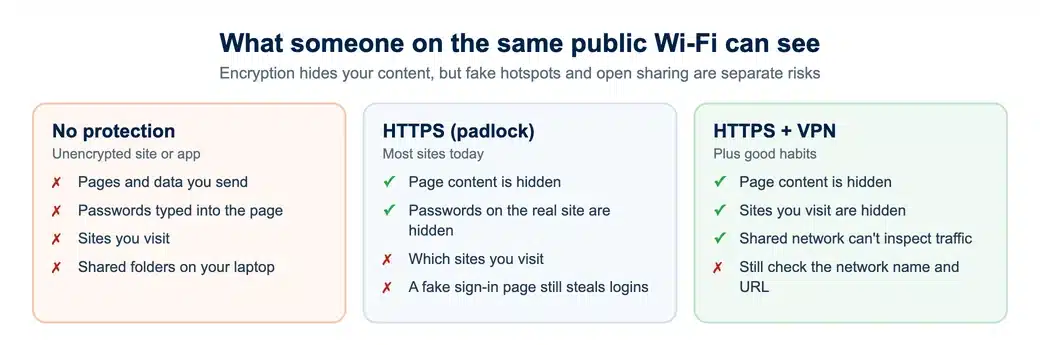
Most websites now encrypt traffic, so public Wi-Fi is far safer than it was ten years ago. The risk has not gone away, though. It has moved to fake hotspots, look-alike login pages, shared folders left open and weak accounts.
This guide explains what is actually at risk when you research on public Wi-Fi, and the short list of habits that protect your data, your participants and your ethics approval.
Why Public Wi-Fi Still Puts Research Data at Risk
The US Federal Trade Commission now says that, because most sites encrypt traffic, connecting through public Wi-Fi is usually safe for everyday browsing. That is true for the padlocked page itself. It is not the whole picture for a researcher.
Attackers can set up a hotspot called something like “Campus_Free_WiFi” and wait for people to join. A look-alike sign-in page can then collect your university password, which no padlock on the real site can protect.
Laptops also announce themselves on shared networks. File sharing, network drives and wireless discovery features can expose folders that were never meant to leave your desk.
The same care applies to the online tools you paste research into. Before uploading anything, it is worth asking whether you can trust AI tools with your research data.
What students have to lose
A stolen password is annoying for most people. For a researcher the stakes are higher, because the data often belongs to other people.
- Participant data. Interview recordings and survey responses come with legal and ethical duties. In the UK, the UK GDPR requires personal data to be kept secure.
- Unpublished findings. Drafts and early results are easy to lose, leak or have scooped.
- Institutional access. One stolen login can open journal subscriptions, repositories, email and shared drives.
If you are collecting qualitative interview data, your ethics application probably promised secure storage. A careless upload over café Wi-Fi can break that promise without anyone noticing.
The padlock protects the page you are on. It does nothing for the fake hotspot you joined to get there.
Practical Steps to Secure Your Work
A few small habits cover most of the risk on public Wi-Fi. None of them take long, and each closes a gap an attacker could use to reach your research files or university logins.
Connect to the official network
Ask staff for the exact network name and use the official hotspot. Turn off automatic joining of open networks, so your device does not quietly connect to a look-alike while it is in your bag.
Stay on HTTPS and keep software patched
Look for the padlock before typing a password into anything, and check the address is the one you expect. Update your browser, operating system and reference manager regularly, because those updates close the exact holes attackers look for.
Add a second step with multifactor authentication
A password on its own is only half a lock, and a stolen one is far less useful once a second step is required. CISA explains how to turn on multifactor authentication for email, cloud storage and university portals.
Turn off file sharing and device discovery
On any network other people share, switch off file and printer sharing, and set AirDrop or its equivalent to contacts only. Turn them back on when you are home.
Keep sensitive files off the open network
Wait until you are on a trusted connection before uploading participant data. If you cannot wait, encrypt the file first and use your university’s approved storage, never a personal file-sharing link.
The same applies to interview transcripts and raw survey exports: they are usually the most sensitive files in a project, and the easiest to send without thinking.
Worked example: uploading interview transcripts from a café
Amira has finished five interviews for her master’s dissertation and wants to back up the transcripts before her laptop battery dies. She is in a café with an open network.
Instead of dragging the folder into a personal cloud link, she joins the café’s named network, switches on her VPN, and uploads an encrypted copy to her university’s approved storage.
She then turns off file sharing and logs out of the portal. The data never travels unprotected, and she has kept the storage promise in her ethics application.
VPN Basics for Students: What to Look For
A virtual private network encrypts your traffic between your device and the VPN server, so someone watching a café network sees scrambled data instead of your activity. It does not replace the habits above, but it closes gaps they leave open.
These are the features the VPNOverview team and other independent reviewers weigh when comparing VPNs. They matter more for research data than speed claims do.
| What to check | Why it matters for research |
|---|---|
| Strong encryption | Keeps files and logins scrambled while they travel over the shared network |
| No-logs policy | The provider keeps no record of your activity that could later leak or be handed over |
| Kill switch | Cuts the connection if the VPN drops mid-upload, so nothing slips out unprotected |
| Leak protection (DNS and IPv6) | Stops your device quietly revealing the sites you visit outside the tunnel |
| Speed and device limits | Fast enough for video interviews and large downloads, on both phone and laptop |
Be wary of free VPNs. Some fund themselves by collecting and selling user data, which defeats the point. A reputable paid service, often discounted for students, is the safer choice for sensitive work.
Check whether your university already provides a VPN. An institutional VPN usually exists to reach library and network resources, which is a different job from protecting your privacy on a café network.
Universities themselves are tightening up for the same reasons, as our look at how cybersecurity is shaping academic research explains.
Collecting primary data for your dissertation?
Our researchers can design and run surveys or interviews with secure, ethics-ready data handling.
Habits That Make the Biggest Difference
Technology only helps if you use it every time. These five habits do most of the work:
- Connect to the VPN before you open any research file or portal.
- Log out of every account when you finish, especially on a shared computer.
- Use a password manager, so each account has its own unique password.
- Back up your data to encrypted or institution-approved storage.
- Use your phone’s hotspot instead of public Wi-Fi for the most sensitive work.
Scams aimed at students often arrive while you are connected somewhere unfamiliar. Our guide to common online scams that target students covers the fake login emails worth knowing about.
If your project involves vulnerable participants or sensitive topics, the Electronic Frontier Foundation’s Surveillance Self-Defense guides go deeper into threat modelling for researchers.
Studying overseas brings its own set of networks and risks. See how to stay safe online when studying abroad for the wider picture.
Conclusion
Every student uses public Wi-Fi at some point. You do not have to avoid it, only stop being an easy target. Confirm the network name, turn off auto-join, switch on multifactor authentication and keep your software updated.
Then add a trusted VPN before you connect, not after, and keep participant data off open networks altogether. Those few habits protect your work, your degree and the people who trusted you with their data.
Need help with the dissertation itself?
Work with a UK academic in your subject, from methodology and data analysis through to the final draft.